




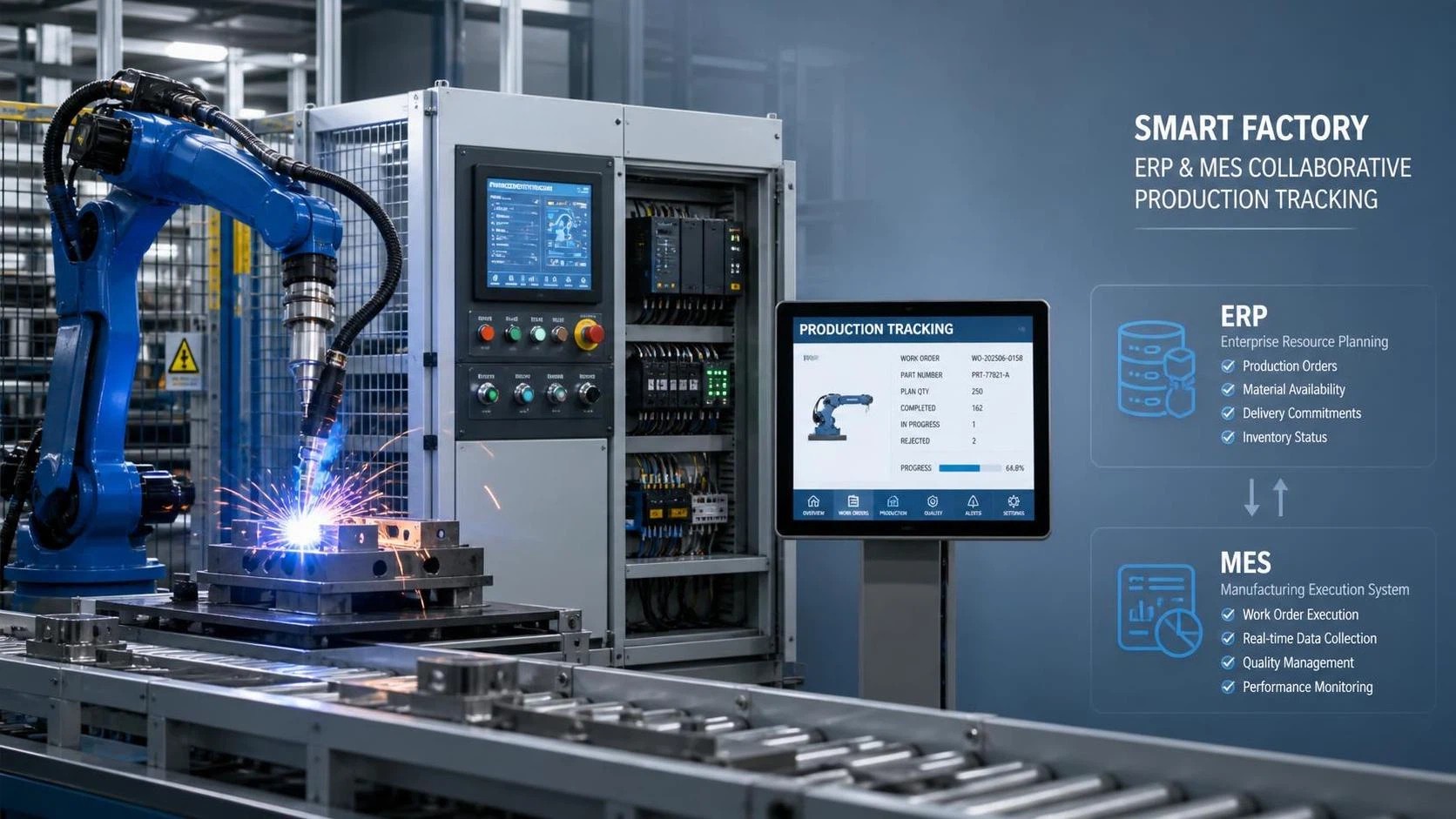
A common situation in fabrication shops is that the welding robot is running, parts are moving, and orders are progressing, but production records still depend on manual notes, spreadsheet updates, or delayed entry into the office system. That gap creates confusion fast. Supervisors want to know which job is in progress, planners want accurate completion status, and quality teams need traceable records, yet the machine data and the management system are often not speaking the same language.
So when people ask, “Can a welding robot connect to ERP or MES for production tracking?” the practical answer is yes, in many cases it can. The more important point is understanding what “connect” really means, what data should move between systems, and what conditions have to be in place before integration becomes useful rather than frustrating.
Why this question comes up so often in real production
Many manufacturers start automation in a very practical way. They add a welding robot to improve consistency, reduce repetitive manual work, or increase throughput on repeat parts. The robot cell may perform well on its own, but production tracking often stays disconnected. Operators may scan a paper traveler, write down shift output, or report downtime at the end of the day. Meanwhile, ERP handles orders, inventory, and planning, while MES may manage work orders, routing, and shop-floor visibility.
The problem appears when teams assume that because the robot is automated, reporting is automatically digital too. In practice, a welding robot can generate useful production signals, but those signals still need to be collected, interpreted, and passed to the right platform. Without that step, managers end up with partial visibility: the machine is productive, but the data trail remains incomplete.
This is especially relevant in metal fabrication and machinery processing environments where a welding robot may be part of a wider flow that also includes CNC cutting machines, milling machines, laser cutting machines, plate preparation equipment, and downstream assembly. If one process is digitized and the rest are managed separately, tracking becomes uneven and planning accuracy suffers.
What usually goes wrong when a welding robot is not linked to ERP or MES
The first issue is delayed status reporting. If a work order is completed at the robot cell but only updated later in the ERP or MES, scheduling decisions are already based on outdated information. This can lead to unnecessary waiting, duplicate job release, or confusion about whether a batch is still in process.
The second issue is weak traceability. Production tracking is not only about counting finished pieces. In many welding applications, teams also want to know which program was used, when the job started, when it ended, whether an alarm interrupted the cycle, and which parts were processed under that work order. If that information is missing or inconsistent, investigating quality concerns becomes slower and more uncertain.
The third issue is poor visibility into utilization and downtime. A welding robot may appear busy from a distance, but actual production losses often come from setup delays, waiting for parts, fixture issues, program changes, or operator intervention. ERP systems alone rarely capture this machine-level detail unless there is a proper data bridge from the equipment or from an MES collecting the signals.
Another common problem is mismatched expectations between departments. IT may focus on system compatibility, production may care about ease of use, and management may expect real-time dashboards immediately. When nobody defines the scope clearly, the integration project becomes larger and more complicated than it needs to be.
Can a welding robot connect to ERP or MES for production tracking in a practical sense?
Yes, but usually not by a single direct cable-and-done setup. In most real factories, integration works through several layers. The robot controller provides machine or cycle data. A PLC, cell controller, industrial PC, middleware platform, or MES interface collects that data. Then the ERP or MES receives the production events it actually needs, such as job start, job completion, quantity produced, alarm status, or operator confirmation.
That means the question is not only whether the welding robot supports communication, but also whether the factory has defined the data points, system roles, and process rules. A robot can often communicate through standard industrial protocols or interface options, but ERP systems generally do not need every raw signal from the robot. They need structured, business-relevant information.
In many setups, MES is the more natural layer for shop-floor collection because it is closer to the machine side. ERP often remains the planning and transaction system, while MES translates production events into a form that supports reporting, traceability, and execution control. If there is no MES in place, a simpler gateway or custom middleware may still be enough for selected tracking tasks.
Common misunderstandings that make integration harder than it should be
One misunderstanding is thinking that every robot integration must be complex from the start. A lot of teams try to define every possible data point before they have even agreed on the main purpose. If the immediate goal is production tracking, begin with a limited set of events: work order identification, cycle start, cycle complete, quantity confirmation, fault event, and operator acknowledgment where needed.
Another misunderstanding is assuming ERP should receive raw robot data directly. In most situations, that creates more noise than value. ERP works best with clean transactional records, not streams of low-level machine events. If you send too much detail to the wrong system, users stop trusting the data because it becomes difficult to interpret.
A third mistake is overlooking the physical side of the process. Good integration is not only software logic. It depends on how jobs are loaded, how parts are identified, whether barcode or job selection exists at the cell, how fixture changes are handled, and who confirms scrap or rework. If the shop-floor workflow is vague, system integration simply reproduces that vagueness faster.
How to evaluate whether your current welding robot setup is ready
If you are trying to decide whether a welding robot can integrate with existing ERP or MES systems for production tracking, it helps to check readiness in four areas.
- Controller and interface capability: Confirm what communication options the robot controller, welding power source, and any cell PLC actually support. The answer may depend on model, software version, or optional modules.
- Data definition: Decide which production events matter. Typical examples include work order number, part number, planned quantity, produced quantity, cycle count, alarm code, start time, stop time, and operator ID.
- System ownership: Clarify whether ERP, MES, or another layer is responsible for dispatching jobs, collecting execution data, and storing traceability records. If roles overlap, integration logic becomes messy.
- Shop-floor discipline: Check whether operators can reliably identify jobs and confirm exceptions. Even good software cannot correct missing work order selection or inconsistent handling of rework.
This readiness check often reveals that the technical connection is possible, but the process definition still needs work. That is normal. It is better to find those gaps early than after the interface has already been built.
A practical integration path that usually works better than starting too big
For most manufacturers, a staged approach is more effective than trying to create full digital synchronization across every machine and department at once. Production tracking improves fastest when the first integration target is narrow and measurable in operational terms.
- Start with one cell and one workflow. Pick a welding robot application that runs regular jobs with stable routing. Repetitive production is easier to map than highly variable custom work.
- Define the minimum useful events. For example: work order loaded, welding cycle started, cycle finished, quantity confirmed, and alarm raised. This creates a clean tracking foundation.
- Decide how jobs are identified at the cell. Barcode scanning, touchscreen selection, or automatic job download can all work, but there must be one clear method.
- Use MES or middleware to normalize machine signals. This step helps convert robot or PLC events into records that ERP or reporting tools can use consistently.
- Validate the data against real shop activity. Compare system records with actual production for several runs. Look for missed counts, duplicate events, or timing mismatches.
- Expand only after the first cell is stable. Once the logic works for one robot cell, it becomes easier to extend to additional welding stations or related equipment.
This approach is useful whether the operation includes standalone robot welding cells or a broader fabrication line with cutting, beveling, fit-up, and material handling steps around it.
What data is usually worth tracking first
Not every signal deserves a place in production tracking. The best starting set is the one that helps planning, traceability, and daily management without overcomplicating the project.
In many welding applications, the first data points worth tracking are:
- Work order or production order number
- Part number or assembly ID
- Program or recipe reference
- Cycle start and cycle end time
- Completed quantity
- Alarm or interruption status
- Operator or shift identification where required
- Manual notes for scrap, pause reason, or rework if the process needs it
That set is usually enough to support useful ERP or MES reporting. More detailed welding parameters may also be relevant in some environments, but they should be added because they support a defined quality or traceability need, not simply because the data exists.
Where equipment selection affects integration later
Many integration problems begin earlier than people expect, often at the equipment selection stage. When companies compare automatic welding equipment, welding robots, CNC cutting machines, laser cutting machines, or H-beam production line equipment, they naturally focus on capacity, mechanical stability, and process fit. That is necessary, but communication capability should also be reviewed before purchase if production tracking matters.
For example, if a business expects future linkage to ERP or MES, it is useful to ask how the machine exposes production signals, what controller architecture is used, and whether the supplier can explain interface options in operational terms. A supplier with experience across fabrication equipment categories may be able to help buyers think about compatibility beyond the robot itself, especially when the welding cell will sit inside a larger production flow rather than operate alone.
Companies such as Wuxi Samgins International Trade Co.,Ltd, which handle welding robots alongside automatic welding equipment, CNC machine tools, laser cutting machines, and structural steel production equipment, are part of the type of supply context where these interface questions often come up. That does not replace software integration planning, but it does matter when matching equipment capability to the factory’s digital expectations.
How to avoid repeat problems after the connection is live
Once the robot is connected and data begins flowing, the next challenge is keeping the information reliable. Integration projects often succeed technically but drift operationally because nobody maintains the rules around them.
A few habits make a difference. Keep event definitions simple and documented. Make sure the production team agrees on what counts as completed quantity, interrupted cycle, and rework. Review alarm mappings so maintenance and production are reading the same meaning from the same event. Keep job identification methods consistent across shifts. If a manual override exists, define when it is allowed and who reviews it.
It also helps to separate what must be real time from what can be periodic. Some manufacturers expect every dashboard to update instantly, but not every business decision needs second-by-second refresh. Stable, trustworthy tracking at the right interval is usually better than noisy data with false precision.
Frequently Asked Questions
Does every welding robot support ERP or MES integration?
No. Many can participate in integration, but the actual capability depends on the robot controller, software options, surrounding PLC or cell controls, and the systems you want to connect. It is important to confirm interface details rather than assume all robots behave the same way.
Is MES necessary, or can the robot connect directly to ERP?
It depends on the scope. For simple production tracking, direct connection through a gateway or middleware may be possible. For broader shop-floor control, traceability, and machine data normalization, MES is often the better fit because it sits closer to execution.
What is the most common reason these projects fail?
Usually it is not the robot itself. The common failure point is unclear process definition: no agreed job identification method, too many data points collected too early, or confusion about which system owns which function.
Should we collect welding parameters for production tracking?
Only if those parameters support a clear traceability or quality requirement. For basic production tracking, order status, counts, timestamps, and exception records are often more valuable than a large volume of technical data that nobody uses consistently.
Can this approach work in mixed equipment workshops?
Yes. In fact, it becomes more useful in workshops where welding robots work alongside cutting, machining, or structural steel equipment. The key is to standardize how production events are identified and transferred across different machine types.
Conclusion
If you are asking whether a welding robot can connect to ERP or MES for production tracking, the realistic answer is yes, but success depends less on the word “connect” and more on the design of the workflow around it. The technical interface matters, but so do job identification, event definition, system roles, and the discipline of daily shop-floor use.
The most reliable path is to start with a clear tracking objective, a limited set of production events, and one stable robot application. Once that works, expanding to more welding cells or related fabrication equipment becomes much more manageable. That is usually the point where integration stops being a vague digital goal and starts becoming a practical production tool.